June 12, 2011

Pinguy OS Lite is a good Ubuntu Unity Alternative

Another alternative to the dreaded Ubuntu Unity interface is a custom Ubuntu distro called Pinguy OS. There are 2 versions, a full DVD version, and a Lite CD version. The distro booted right up on my laptop finding the wireless drivers which was impressive. It has the Elementary theme installed, but no Libre Office installed. Not even a screen capture program is there, but the familiar Ubuntu Software Center can rectify that quickly. Below are my screen shots and a link to download.


You can download it here: http://pinguy-os.sourceforge.net/


June 11, 2011

Xubuntu a great Ubuntu Alterntative to the Unity Menu

In my review of the various alternatives to Ubuntu's new Unity menus, which I hate, Xubuntu 11.04 fills the bill nicely. It has all the programs of regular Ubuntu 11.04 including Firefox v4.0, Gmusic-browser, and Pidgin less, the Unity menus, and it is fast. Another great Linux distro to put on a USB stick or CD to carry around with me in my travels. Below are my screen shots and a link where to download it. I switched off the black border in favor of a silver one, to give it a more Leopard look. And the dock launcher is a nice touch. Very nice job Xubuntu....


You can download the ISO here for Xubuntu: http://xubuntu.org/get

Macpup 525 is a lighweight up to date Linux Distro

I'm always looking for a good looking complete Linux Distro to carry around in my bag, or to promote the use of Linux,  to use as an emergency recovery, or get on the Internet when traveling our offices. Ubuntu or Mint have been used in the past, but Macpup 525, the latest version of PuppyLinux, is now worthy of this. It comes pre-installed with nicelooking graphics and Firefox v4.0, and is fast. It also has DVD/CD burning, and wireless drivers.

Macpup 525 is the latest and is based on Puppy Linux 5.2.5 ,"Lucid Puppy", An official woof build of puppy Linux that is binary-compatible with Ubuntu Lucid Lynx packages. This contains all the apps from Lucid puppy with the addition of Firefox 4.0.1. Extra apps like Opera or Gimp are available for easy download from the Quickpet App on the ibar or the Puppy Package Manager. This version also includes the Enlightenment E17 window manager. The EFL libraries version 1.0.999 and E17 version 59456 where compiled and installed from source.

Below are my screen shots using this slick little 150MB distro...and the download link where to get it:


Gnumeric spreadsheet


Abiword word processor


Linux is a free operating system, and Puppy Linux is a special build of Linux meant to make computing easy and fast.
Puppy Linux enables you to save money while doing more work, even allowing you to do magic by recovering data from destroyed PCs or by removing malware from Windows. See these example articles: recovering files from Windows and safe Internet banking with Puppy Linux.
With Puppy Linux, you can carry your programs and data anywhere.
  • Easy - Just use a CD or USB flash to boot a PC. Puppy Linux is downloadable as ISO, an image that can be burned to CD or DVD.
  • Fast - Because Puppy is small, it can live in your PC's memory and be ready to quickly execute your commands, whereas in other systems, programs are first read from drive storage before being executed.
  • Save Money - Even if your PC has no hard disk (ex, broken hard disk), you can still boot Puppy via CD or USB and continue working. Old PCs that no longer work with new systems will still work good-as-new with Puppy.
  • Do More - Puppy boots in less than a minute, even in old PCs, and it does not require antivirus software. Administering Puppy is quick and minimal. With Puppy, you just have to take care of your data, which you can easily save to USB flash (Then forget about your operating system!). Your data can be read by other computers.
  • Do Magic -Help your friends suffering from computer malware by booting Puppy and removing malware from their PC (use antivirus that is built-in or can be installed in Puppy). Example - bad Autorun.inf is easily removed by Puppy (Just delete it as well as its companion exe program). If your friend thinks that she has lost data from her corrupted hard disk, boot Puppy and try saving her data!
  • Carry Anywhere (Portable) - Because Puppy is able to live in CD/DVD or USB flash, as well as save data to these same devices, you can carry your programs and data with you.
Are you now ready for Puppy? Keep these important reminders before using Puppy:
  • You don't have to install Puppy (to hard disk) to use it. Simply burn the ISO to CD/DVD and boot the PC or laptop with it. Once booted, you can then install it to USB flash (see the Setup menu), so you can use it for booting the PC when a CD is not available.
  • You don't have to save data to hard drive to work with Puppy. You can save data to USB flash or even to Internet storage (like www.drop.io ). When installed to USB flash, Puppy consumes only a little over 100 MB, or about 256 MB with OpenOffice. You can use the same USB flash (where Puppy is installed) for saving data. 
You can download it here: http://macpup.org/

May 30, 2011

10 Other Great Linux Browsers

Just because many use Firefox or Chromium, does not mean there are not other alternatives. See the below article on others...

Firefox has been a reliable browser for me for many years and it still continues to be so to a certain extent. However, over the last few releases Firefox has become bloated and slow in performance that same way IE used to be before we switched to Firefox. The only thing that is stopping me from switching to another browser, is the large number of extensions available for Firefox. Specifically firebug. Since I spend most of my time on a Linux system, over the last few days I have been looking for an alternative Linux browser. Here are 10 of the best Linux browsers out there that can be a decent alternative to Firefox:

1) Opera
screenshot-woopra-a-real-time-web-tracking-application-for-the-rest-of-us-geektechnica-opera

2) Konqueror

konq_about

3) Galeon

screenshot

4) Epiphany

screenshot-2

5) Arora

arora_webbrowser

6) Midori

screen1

7) Seamonkey

screenshot-11

8) Netsurf

gtkbbcnews

9) Amaya

amaya

10) Kazehakase

screenshot-31

You might also want to try out early builds of Chrome for Linux, which is not quite ready yet. If you are in to terminal based browsers, check out lynx and links.

Source:  http://geektechnica.com/2009/05/beyond-firefox-10-other-great-linux-browsers/

How to Install LibreOffice in Ubuntu 10.xx

The following tutorial will teach every Ubuntu 10.10 and Ubuntu 10.04 LTS user how to install the new LibreOffice open source office suite and replace the old OpenOffice.org office suite from Oracle. From Softpedia.com

Last week we've announced that the Ubuntu developers started the transition of the outdated OpenOffice.org packages to the new LibreOffice ones, in the upcoming Ubuntu 11.04 (Natty Narwhal)operating system, due for release in late April this year.

However, the LibreOffice package are also available for Ubuntu 10.10 (Maverick Meerkat) and Ubuntu 10.04 LTS (Lucid Lynx) users. To remove OpenOffice.org from your system and install LibreOffice, follow the next step-by-step (with screenshots) tutorial.

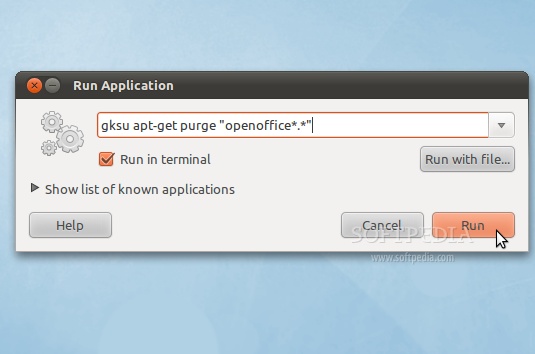
Step 1 - Remove OpenOffice.org

Hit the ALT+F2 key combination on your keyboard, check the "Run in terminal" option and paste the following command in the "Run Application" dialog:

sudo apt-get purge "openoffice*.*"

Review image

A terminal window will appear. Enter your password when asked and hit the OK button.

When you will be asked if you want to remove the OpenOffice.org package, type Y and hit Enter. After this, the OpenOffice.org packages will be removed and the terminal window will disappear...

Review image

Step 2 - Add the LibreOffice repository

No matter what operating system you are running (Ubuntu 10.10 or Ubuntu 10.04), hit the ALT+F2 key combination on your keyboard, check the "Run in terminal" option and paste the following command in the "Run Application" dialog:

gksu add-apt-repository ppa:libreoffice/ppa

Review image

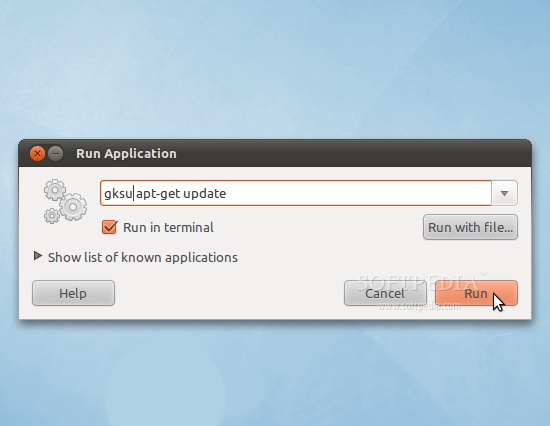
Enter your password when asked and hit the OK button. A terminal window will appear for a few seconds, and it will automatically close. Hit the ALT+F2 key combination again, check the "Run in terminal" option and paste the following command in the "Run Application" dialog:

gksu apt-get update

Review image

Enter your password when asked and hit the OK button. A terminal window will appear for a few seconds, and it will automatically close.

Step 3 - Install LibreOffice

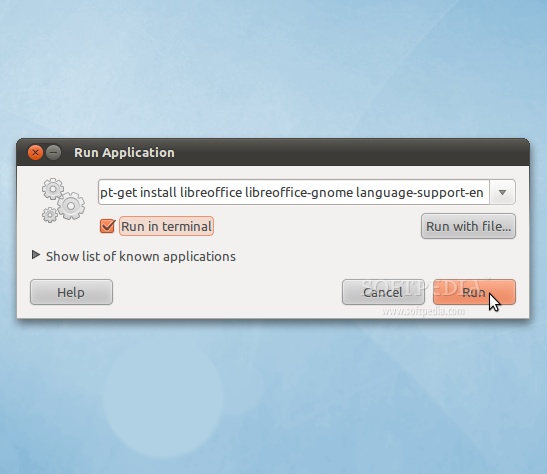
Hit the ALT+F2 key combination on your keyboard, check the "Run in terminal" option and paste the following command in the "Run Application" dialog:

sudo apt-get install libreoffice libreoffice-gnome language-support-en

Review image

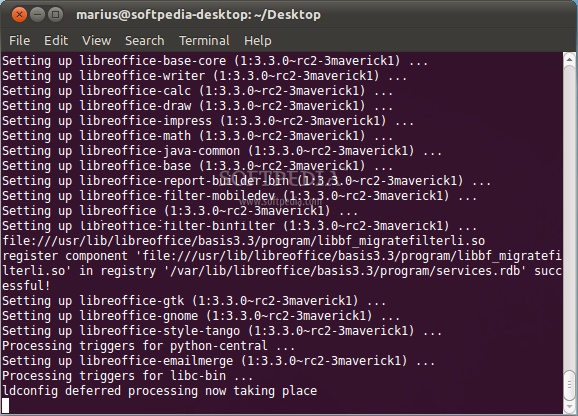
A terminal window will appear. Enter your password when asked.

When you will be asked if you want to install the LibreOffice packages, type Y and hit Enter. Wait for the installation to finish...

Review image

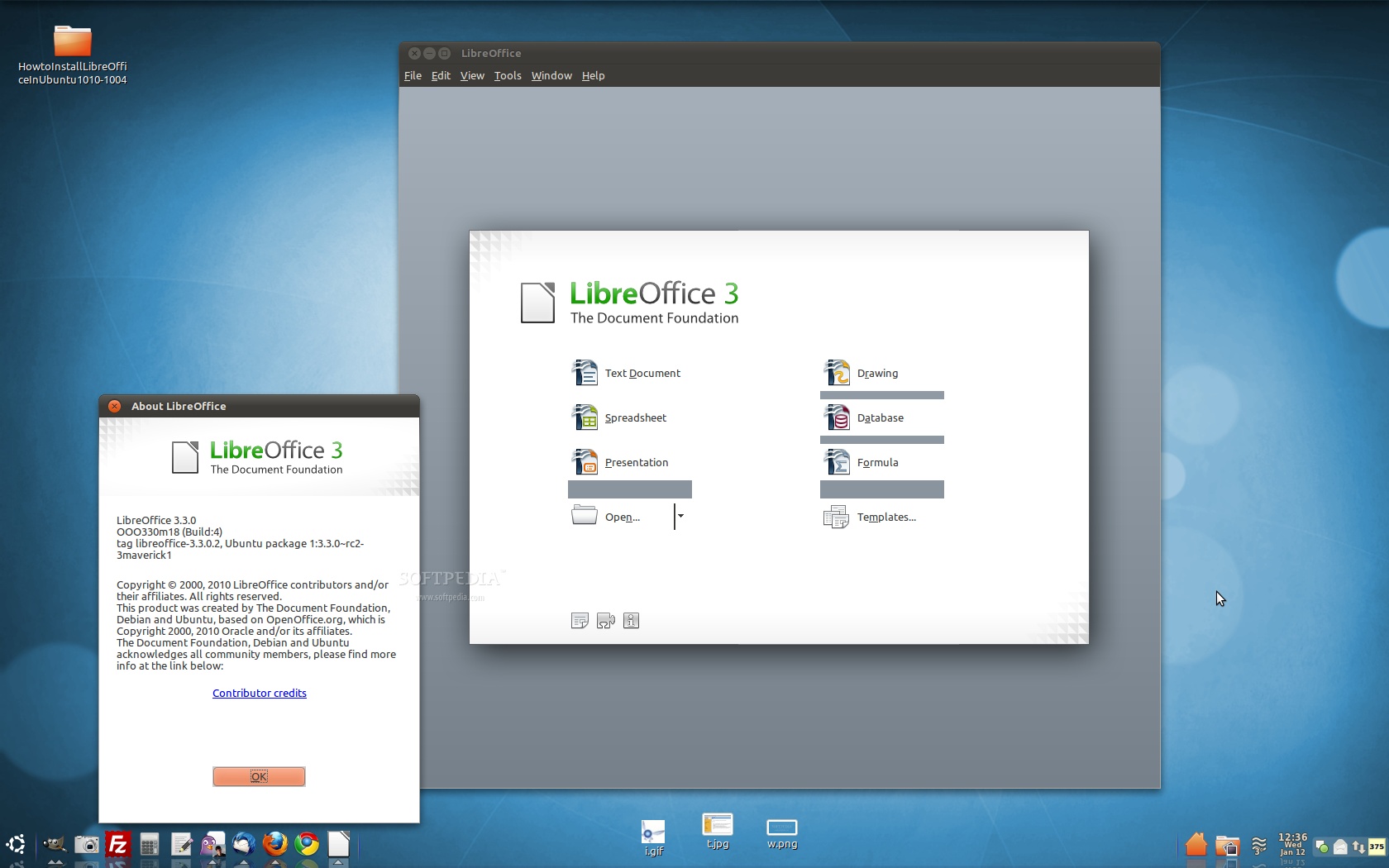
That's it! LibreOffice is now completely installed in your Ubuntu machine.

Review image

If you have problems with the tutorial, do not hesitate to comment below!

http://news.softpedia.com/news/How-to-Install-LibreOffice-in-Ubuntu-10-10-and-Ubuntu-10-04-177762.shtml

May 21, 2011

Ubuntu alternatives who hate the Unity Interface

Top 4 Lightweight, Official Ubuntu Based Alternatives for Ubuntu 11.04's Unity 3D
POSTED BY MANUEL JOSE ON WEDNESDAY, MAY 18, 2011, from techdriveIn.com


Many long term Ubuntu users have been quite critical towards Ubuntu's new Unity interface. Unity has its share of issues which Canonical is hopeful of rectifying by the next major release,Ubuntu 11.10 Oneiric Ocelot. In the mean time, if you are not at all able to adjust with the revamped albeit buggy Unity desktop, there are a bunch of absolutely awesome Ubuntu based distros which runs on other interfaces like KDE, XFCE, LXDE etc. Here is how you install each of them as a different session in Ubuntu 11.04 Natty Narwhal.

Ubuntu 11.04 Unity Replacements


Ubuntu 11.04 Unity Replacements 
Linux is all about choice. If you don't like Ubuntu 11.04's new Unity interface, simply download and install an alternative distro of your liking. Speaking of alternatives, here are some of the most respected yet official Ubuntu derived distros you need to know.

Unity 2D
unity 2d ubuntu 11.04

Unity 2D's goal is to provide the Unity desktop shell on hardware platforms that cannot currently support Unity's OpenGL requirements. Simply put, Unity 2D is a lightweight Unity interface that can run smoothly on non accelerated hardwares. Unity 2D is not a default in Ubuntu 11.04 Natty Narwhal and is very much a work in progress. But from Ubuntu 11.10 Oneiric Ocelot onwards, Unity 2D will replace classic GNOME as the default fall back desktop.
  • In order to install Unity 2D in Ubuntu 11.04 Natty Narwhal, copy-paste the following commands into Terminal.
sudo apt-get install unity-2d
  • Now, if you want to install the latest build of Unity 2D in Ubuntu 11.04 instead of stable Unity build, do the following.
sudo add-apt-repository ppa:unity-2d-team/unity-2d-daily
sudo apt-get update
sudo apt-get install unity-2d
  • Done. Now, simply choose Unity 2D session from Ubuntu login window.


Lubuntu
install lubuntu in Ubuntu 11.04

Lubuntu is a faster, more lightweight and energy saving variant of Ubuntu based on LXDE desktop, the Lightweight X11 Desktop Environment. Lubuntu is actually not part of the Ubuntu family yet, but might soon become one. According to Distrowatch's statistics, Lubuntu is already popular than Ubuntu derivatives like Kubuntu and Xubuntu and even fares well against such established names like Mandriva. Lubuntu project started off in 2008 only.
  • Install Lubuntu in Ubuntu 11.04 by doing the following in Terminal.
sudo apt-get install lubuntu-desktop
  • Done. Lubuntu desktop will now be available within your Ubuntu GDM login window as a different session already.


Kubuntu
kubuntu in ubuntu 11.04

Kubuntu is Ubuntu's KDE based desktop. Kubuntu does not have a good rapport among KDE users and it is considered to be one of the worst implementations of KDE among other Linux distros running KDE. Though I haven't tested it out myself, latest Kubuntu 11.04 is considered to be a much improved version.
  • Install Kubuntu in Ubuntu 11.04 Natty Narwhal by doing the following in Terminal.
sudo apt-get install kubuntu-desktop
  • Done. As before, select Kubuntu session from GDM.


Xubuntu
Top Lightweight Ubuntu Based Alternatives for Ubuntu 11.04

Xubuntu is a Canonical Ltd. recognized, community maintained derivative of the Ubuntu operating system, based on lightweight Xfce desktop environment. Similar to Lubuntu's LXDE environment, the Xfce desktop environment is intended to use fewer system resources than the default Ubuntu Unity desktop. The Xubuntu developers claim that the minimum RAM Xubuntu can be run on is 128 MB, with 256 MB of RAM strongly recommended.
  • Install Xubuntu in Ubuntu 11.04 Natty Narwhal by doing the following in Terminal.
sudo apt-get install xubuntu-desktop
  • Done. Now, simply select Xubuntu session from Ubuntu GDM login window.
Hope you enjoyed the list. There are other immensely popular yet unofficial Ubuntu derivatives as well. Some of them include Elementary OS, Pinguy OS, Linux Mint and Bodhi Linux among others. Thanks for reading Tech Drive-in.

Source:http://www.techdrivein.com/2011/05/top-4-lightweight-official-ubuntu-based.html?utm_source=feedburner&utm_medium=feed&utm_campaign=Feed%3A+techdrivein+%28Tech+Drive-in%29

May 8, 2011

May Desktop in Blue

The newly announced Bluebird theme for XFCE and Gnome has a nice clean look. Using this metacity theme and the Zuki Blues theme, I went all Blue for May. Included are Chromium and Firefox personas also in blue. Below are my results and a link where to get the themes...


The Zuki Blues theme can be found here:
http://lassekongo83.deviantart.com/art/Zuki-Blues-175190463?q=&qo=

The Bluebird metacity theme can be found here:
http://gnome-look.org/content/show.php/Bluebird+metacity?content=140011

Chrome Bluebird theme:
https://chrome.google.com/webstore/detail/hedddjdackneeciinimepakidindpgdd