June 30, 2026

Fooyin 0.11 Adds Internet Radio Browsing to the Qt Music Player

Fooyin 0.11 music player adds remote stream playback, a new Radio Browser plugin, spectrum visualization, and playlist improvements. By Bobby Borisov on June 25, 2026


Fooyin 0.11 has been released as the latest update to this customizable Qt-based Linux music player, adding remote stream playback, internet radio browsing, new visualization options, and playlist and layout improvements.

The biggest addition is support for remote audio streams, paired with a new Radio Browser plugin that allows users to browse internet radio stations directly from the player. Fooyin 0.11 also features a built-in Radio layout for quick access. The Radio Browser can also be opened from the View menu.


The update also expands Fooyin’s visualization features with a new Spectrum plugin. In addition, a new Sleep Inhibitor plugin can prevent the system from going to sleep while music is playing.
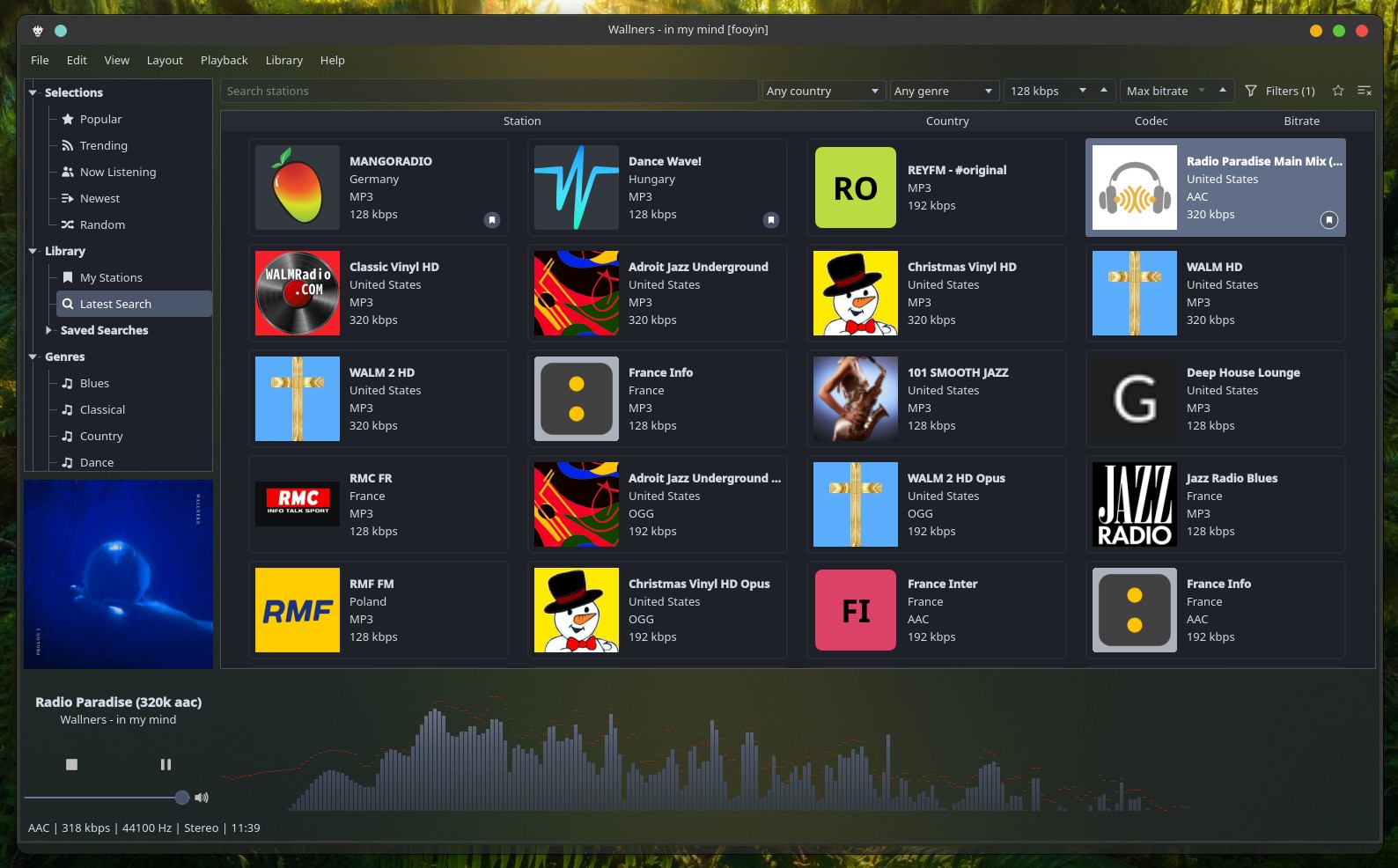
Fooyin 0.11 Music Player

On the playlist-handling side, Fooyin 0.11 adds an integrated playlist search bar with result navigation, support for restoring deleted playlists, randomize and reverse playlist and queue-sort actions, and per-playlist view layouts. Additionally, the performance has been improved when working with large playlists.

In the interface and layout system, users can now import layouts through a dedicated dialog, edit widget margins, configure individual splitter spacing, and use expanded built-in themes. Quick Setup has been updated with theme and playlist options, and player controls now allow individual buttons to be toggled.

Playback-related changes include improved gapless playback handling and a separate time-based played threshold. File operation improvements include advanced settings for immediate delete actions and deleting empty folders, plus suggestions for library roots in the destination field.

Fooyin 0.11 also improves library and metadata handling with support for monitoring individual library files, configurable literal track searches, optimized library track update lookups, improved encoding detection, and a configurable fallback encoding.

Lyrics support gains line and word progress fill options, a seek tooltip, concurrent searches across enabled lyrics sources, and support for transparent background colors. The VU Meter also receives peak falloff support, better configuration options, and improved synchronization with playing audio.

On the fixes side, Fooyin 0.11 addresses repeat-track handling, fade interruptions during track changes, current-track restoration after system shutdown or restart, playlist reordering issues, crashes in interface actions, lyric parsing problems, metadata handling bugs, and several layout and library tree issues.

For additional details, see the changelog. The app is available for installation via Flathub.

Image credits: Fooyin

Source: https://linuxiac.com/fooyin-0-11-adds-internet-radio-browsing-to-the-qt-music-player/


MICROSOFT PROVED LINUS TORVALDS RIGHT — AGAIN

June 13, 2026

Strawberry: A Fork of Clementine Music Player

In this age of streaming music and cloud services, there are still people who need an application to collect and play their music. If you are such a person, this article should interest you. We have earlier covered Sayonara music player. Today, we will be taking a look at the Strawberry Music Player. Strawberry Music Player: A fork of Clementine

The Strawberry Music Player is, quite simply, an application to manage and play your music.


Strawberry contains the following list of features:Play and organize music:

  1. Supports WAV, FLAC, WavPack, DSF, DSDIFF, Ogg Vorbis, Speex, MPC, TrueAudio, AIFF, MP4, MP3, ASF and Monkey’s Audio Audio CD playback
  2. Native desktop notifications
  3. Support for playlists in multiple formats
  4. Advanced audio output and device configuration for bit-perfect playback on Linux
  5. Edit tags on music files
  6. Fetch tags from MusicBrainz Picard
  7. Album cover art from Last.fm, MusicBrainz and Discogs
  8. Song lyrics from AudD
  9. Support for multiple backends
  10. Audio analyzer
  11. Audio equalizer
  12. Transfer music to iPod, iPhone, MTP or mass-storage USB player
  13. Streaming support for Tidal, and other Internet radio streaming stations
  14. Scrobbler with support for Last.fm, Libre.fm and ListenBrainz

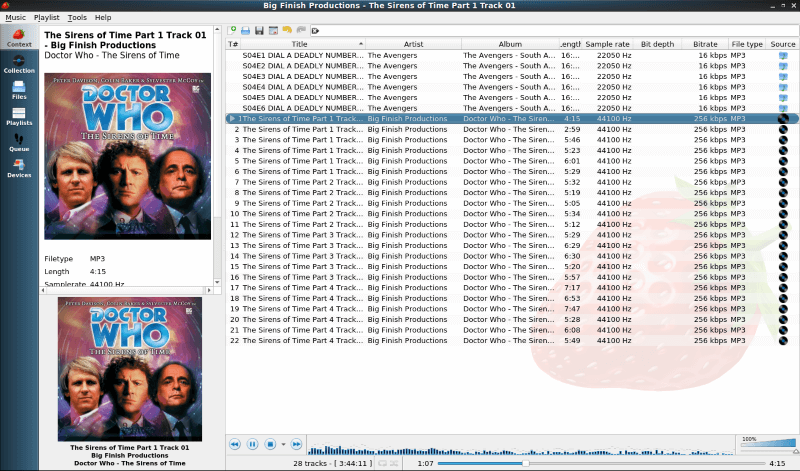
If you take a look at the screenshots, they probably look familiar. That is because Strawberry is a fork of the Clementine Music Player. Clementine has not been updated since 2016, while the most recent version of Strawberry (0.5.3) was released early April 2019.

Trivia
You might think that Strawberry music player is named after the fruit. However, its creator claims that he has named the project after the band Strawbs.
Installing Strawberry Music player

Now let’s take a look at how you can install Strawberry on your system.
Ubuntu

The easiest way to install Strawberry on Ubuntu is to install the official snap. Just type:sudo snap install strawberry


If you are not a fan of snaps, you can download a .deb file from Strawberry’s GitHub release page. You can install the .deb file by double-clicking it and opening it via the Software Center.

Strawberry is not available in the main Ubuntu repositories.
Fedora

Installing Strawberry on Fedora is much simpler. Strawberry is in the Fedora repos, so you just have to type sudo dnf strawberry. Strawberry is not available on Flatpak.
Arch

Just like Fedora, Strawberry is in the Arch repos. All you have to type is sudo pacman -S strawberry. The same is true for Manjaro.

You can find a list of Linux distros that have Strawberry in their repos here. If you have openSUSE or Mageia, click here. You can also compile Strawberry from source.
Experience with Strawberry Music Player

Playing an audio book with Strawberry

I installed Strawberry on Fedora and Windows. I have used Clementine in the past, so I knew what to expect. I downloaded a number of audiobooks and several Old Time Radio shows as I don’t listen to a lot of music. Instead of using a dedicated audiobook player like Cozy, I used Strawberry for listening to these radio shows.

Once I told Strawberry where my files were located, it quickly imported them. I used EasyTag to fix some of the MP3 information on the old time radio shows. Strawberry has a tag editor, but EasyTag allows you to edit several folders very quickly. Strawberry updated the media library instantaneously.

The big plus for me was performance. It loaded quickly and ran well. This might have something to do with the fact that it is not another Electron app. Strawberry is written in good-old-fashioned C++ and Qt 5. No need to load a whole web browser every time you want to play music, or in my case listen to audio dramas.

I was not able to test the Tidal streaming feature because I don’t have an account. Also, I don’t sync music to my iPod.
Final Thoughts

Strawberry is like a standard music player that makes managing and playing your audio library very easy.

The features that I miss from Clementine include the option to access your media from cloud storage systems (like Box and Dropbox) and the ability to download podcasts. But then, I don’t store my media in the cloud and I mainly listen to podcasts on my iPod.

I recommend giving Strawberry a try. You just might like it as much as I do.

Have you ever used Strawberry? What is your favorite music player/manager? Please let us know in the comments below.

If you found this article interesting, please take a minute to share it on social media, Hacker News or Reddit.

Source: https://itsfoss.com/strawberry-music-player/

June 11, 2026

Internet Radio Applications for Linux - 7

I have become a big fan of streaming Internet Radio and Podcasts lately. It avoids all the static, signal strength, and local geographic limitations of terrestrial radio, and you are not tied into using your home audio receiver. It opens up the world to your computer/laptop. And of course many Linux applications have been written to fill this need. Below are several recommendations (Gemini, MakeUseOf, and my own): 

Linux has a robust selection of radio applications, ranging from minimalist "set and forget" tools to full-featured media centers. Depending on whether you want a native desktop experience or something that lives in your terminal, here are the top picks for 2026:

1. Shortwave (The Modern Standard)

Shortwave is the successor to the popular Gradio app and is widely considered the best overall internet radio player for Linux today. It is built in Rust and integrates perfectly with the GNOME desktop, though it works beautifully on any environment.
Key Features: Access to over 50,000 stations via the Radio-Browser database, automatic song recognition, and the ability to record streams.
Best For: Users who want a clean, modern UI that just works.
You can find it here: https://flathub.org/en/apps/de.haeckerfelix.Shortwave


2. Tuner: Internet Radio

Make finding and listening to internet radio stations fun again! Instead of showing all the stations you already know, Tuner presents you a new selection of stations from all over the world every time you hit the Shuffle button. Tuner uses the community-driven station catalog radio-browser.info.
1-Discover new stations every day
2-Star stations you like and visit their website
3-Control Tuner from your volume indicator
You can find it here: https://flathub.org/en/apps/io.github.tuner_labs.tuner


3. Goodvibes (The Lightweight Choice)


If you prefer something that stays out of your way, Goodvibes is a minimalist player that lives primarily in your system tray or as a simple window.
Key Features: It doesn't use a massive database; instead, you add your own favorite station URLs. It’s extremely light on system resources and focuses on stability.
Best For: Older hardware or users who already have a specific list of stations they love.
You can find it here: https://flathub.org/en/apps/io.gitlab.Goodvibes


4. Advanced Radio Player (KDE Specialized)


For those on the KDE Plasma desktop, this is a powerful "professional-grade" option.
Key Features: It supports HLS, MP3, and Ogg Vorbis streams. It features an intelligent caching mechanism to prevent stuttering on unstable connections and handles metadata (like album art) better than most open-source players.
Best For: Users who want deep integration with the KDE ecosystem and high-quality metadata display. You can find it here: https://store.kde.org/p/1313987/


5. PyRadio (The Terminal Powerhouse)


If you spend most of your time in the command line, PyRadio is the gold standard for TUI (Terminal User Interface) radio.
Key Features: Controlled entirely via keyboard shortcuts. It uses mplayer or vlc as the backend and allows for easy station management through simple text files.
Best For: Terminal junkies and fans of "distro-hopping" who want their radio setup to be portable across any system.
You can find it here: https://opensource.com/article/19/11/pyradio


6. Pithos

Pithos is a simple but featured Pandora radio client. Log into pandora.com and create a free account. An easy to use native Pandora Radio client that is more lightweight than the pandora.com web client and integrates with the desktop.
It supports most functionality of pandora.com such as rating songs, creating/managing stations, quickmix, etc. On top of that it has many features such as last.fm scrobbling
It also has some nice plug-in such as a 10-band equalizer and volume normalization.
You can find it here: https://flathub.org/en/apps/io.github.Pithos


7. Gnome Radio


GNOME Radio is Free Internet Radio Software for the GNU Network Object Model Environment. The 73.0 release features 240 international radio stations including Studentradioen i Bergen (Bergen, Norway), Radio Revolt (Trondheim, Norway), Nea Radio (Stjørdal, Norway), Radio Riks Oslo (Akershus, Norway), Radio Rjukan (Rjukan, Telemark), Radio Stortinget (Stortinget, Oslo, Norway), Radio Latin-Amerika (Oslo, Norway), Radio Havana Cuba (Havana, Cuba), The Current (Minnesota, United States of America), Circuito Adulto Joven (Caracas, Venezuela), Radio Greenland (Godthåb, Grønland), UCT Radio (South Africa), Radio Warszawa (Poland), BBC (UK), C-SPAN (USA), Hawaii Public Radio (NPR), NPO Radio 1 (Netherlands), Radio Punjab Today (India), University of Washington (USA), Radio Alhara (Betlehem, Palestine), Radio Haifa (Israel), as well as 100+ city map markers around the world. 
Available at: https://gnomeradio.org/


And many more FlatHub applications:


And there are many more available from the FlatHub Store below: https://flathub.org/en or https://flathub.org/en/apps/search?q=radio


Another article for more reading is available here:

The 5 Best Open-Source Internet Radio Apps for Linux

https://www.makeuseof.com/best-online-radio-apps-for-linux/

For those who are nostalgic (like me) for the classic hi-fi audio tuners of the past here is a nice trip back in time.