March 22, 2026

Q4OS with Win10 Desktop


Q4OS is a fast and friendly, desktop oriented operating system based on Debian Linux. Providing a set of dedicated utilities and specific optimizations, combined with a focus on getting a productive system easily. This makes it ideal for people who want to get a working environment tailored to individual needs and preferences. From this perspective, Q4OS is suitable for both newcomers as well as experienced computer users.

Rock stable -stability, consistence, lightness are our top priorities. This is exactly what Debian upstream guarantees and which is why we honor the Debian development model. Q4OS is designed to be stable, immutable and fail-safe in the long-term .

Visual themes, Lookswitcher- would you like to change the default desktop look and feel ? Install Lookswitcher from the software center to get a few original desktop themes and a one-click tool to easily switch between them. Select a theme you like and enjoy the new desktop appearance.

It is based on the KDE desktop, and comes with Chromium browser, Dolphin file manager, Kate notepad, LIbreOffice suite, screen shot tool, and a System Monitor. It includes a Welcome screen for new users with a list of popular applications called Software Centre, which only take one click to install, such as: VLC media player, Deluge BitTorrent client, Chrome browser, Firefox browser, Mousepad text editor, and Synaptic Package Manager, among others.  It also offers the KDE Software Library. There are several custom themed versions of Q4OS offered: one for XP, one for Win10, and others. It makes the transition to Linux all the more friendly and familiar from Windows.  Below are my screen shots and a link where to download this Win10 version. 


By installing the Look Switcher, you can select from several desktop themes complete with taskbars, icons, window tiles, and wallpapers. There are versions for Win10, Win11, WinXP, and others  (below).


Win11 Theme
After some tweaking, below are my test results attempting a Win11 look:  I added: Win11 wallpaper, Win11 icons, Thunar file manager,  Deadbeef music player, Strawberry music player, Win10 login screen, centered the Task Bar icons, and Mousepad text editor.




You can download this version of Q4OS here: 

https://sourceforge.net/projects/xpq4/files/free10/


March 14, 2026

Shortwave: An Open Source Radio Player Featuring Internet Radio Stations

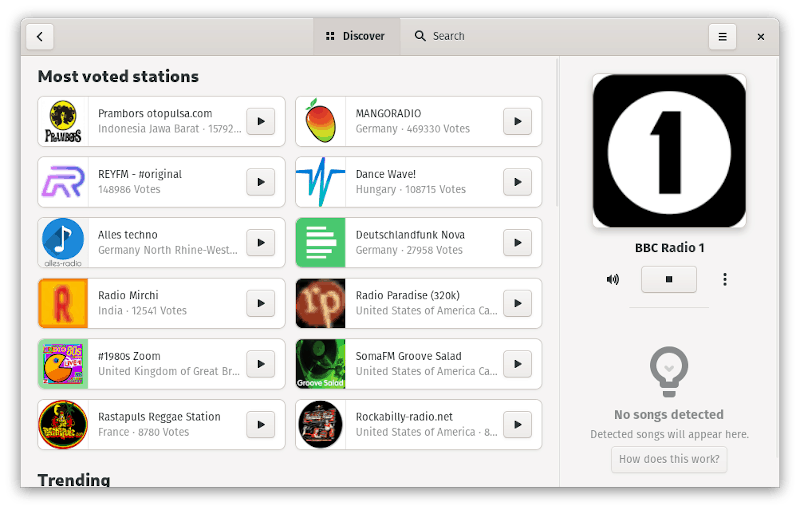
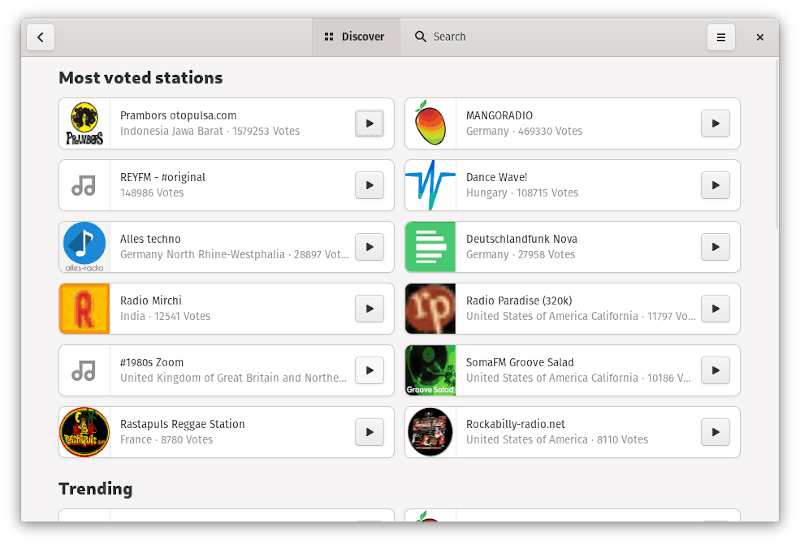
Shortwave is an interesting open-source radio player that offers a good-looking user interface along with a great experience listening to the Internet stations. It utilizes a community-powered database for the Internet stations it lists.

Shortwave is actually a successor of the popular radio app for Linux, Gradio. Its developer Felix joined GNOME and discontinued Gradio to create Shortwave from scratch in Rust programming language. If you were using Gradio as your preferred Internet radio station player, you can import the library as well.

Recently, Shortwave released its first stable version and seems to push new updates after that as well.

Features of Shortwave

Shortwave Radio app interface

It is a quite simple and useful Internet radio station player for Linux. However, to filter out what it offers, here’s a list of its features:

  • Utilizes Community-powered Radio Station Listing
  • Supports importing from Gradio
  • Features numerous Internet radio stations from across the globe
  • Supports streaming/casting the radio stations to supported devices (Chromecast support)
  • Identifies the song playing on the radio station
  • Offers a dark-mode toggle option (even though it didn’t work while I wrote this, should be an easy fix in the future updates)

Installing Shortwave on Linux

Shortwave Radio player for Linux

The source code can be accessed on GNOME’s GitLab page. It is already available in AUR for Arch users.

For other distributions, you can grab the Flatpak package. If you haven’t setup Flatpak on your system, simply follow our Flatpak guide to get started.

Once you have made sure to install Flatpak support on your system, you have to type in the command below to install shortwave on Linux via terminal:

flatpak install flathub de.haeckerfelix.Shortwave

You can also choose to install beta/nightly builds by following the instructions mentioned in their official GitLab page.

Wrapping Up

The user interface and the user experience was quite good. Even though I faced minor glitches while selecting (or clicking) on the channels listed, everything else worked like a charm.

Just for reference, I tried it on Pop!_OS 19.10 and it worked well. You can also easily try the Flatpak package on other Linux distributions.

Feel free to let me know your thoughts on Shockwave and where you tried it on.

Source: https://itsfoss.com/shortwave-radio-player/

March 12, 2026

Free Internet Radio Directories for Listeners (Google Gemini)

 Top Directories for Listeners- These platforms offer the best user experiences for discovering and streaming global content. 


  • Radio Garden: The most immersive way to find radio. It features a 3D interactive globe where you can rotate the earth and tune into live broadcasts from thousands of cities. It is excellent for finding niche community and independent stations.  

    TuneIn: The industry heavyweight. It has the largest collection (100,000+) of AM/FM and internet-only stations, including major sports networks and news outlets like CNN and BBC

    Radio.net: A clean, straightforward directory with over 60,000 stations. It’s particularly strong for European stations but has a massive global reach and excellent mobile apps.

    Online Radio Box: A favorite for listeners who want to know what’s playing now. It provides live playlists and historical logs of tracks played on each station.

    Streema: Highly organized by city and genre. 1 It is one of the most stable directories for finding local AM/FM stations that have moved to a web stream.

    Niche & Specialized Directories

    If you are looking for something specific, like indie music, high-quality audio, or accessibility, try these:

  • SomaFM: A listener-supported, commercial-free directory of over 30 channels of underground/alternative music (chill, lofi, indie, electronic).

  • Filtermusic: A directory specifically focused on electronic and dance music radio stations, updated daily.

  • Radio-Locator: A highly technical search engine for U.S. and international stations. It provides detailed info on signal range and transmitter locations.

  • BlindRadio: Designed specifically to be accessible for the visually impaired, focusing on ease of navigation.

  • NTS Radio: A global platform for artist-run radio, perfect for discovering experimental or avant-garde music.

         Source: Google Gemini

My Top 3 Favorites:

     Internet Radio Directory:  https://www.internet-radio.com/

     iHeart Radio:  https://www.iheart.com/

     Pandora Radio:  https://www.pandora.com/

Internet Radio Station Directories (chatgpt)

If you're looking for directories that list Internet radio stations, there are a few reliable websites and services where you can explore different stations by genre, location, or popularity. Here are some popular ones:


1. TuneIn

  • Description: One of the most well-known platforms for streaming live radio from around the world. TuneIn offers both music and talk stations, and you can search by genre, location, or specific station.

  • Features: Has a mobile app, podcasts, and news alongside radio streams.

2. Radio.com (now Audacy)

  • Description: A comprehensive directory of live radio stations, offering everything from news to music, sports, and talk shows. The website's directory allows users to search by city, genre, or station.

  • Features: Popular in the U.S. with a vast collection of stations.

3. Radio Garden

  • Description: A unique and interactive radio directory that lets you explore live radio stations worldwide using an interactive globe. You can zoom into cities around the world to listen to local stations.

  • Features: Geolocation-based, interactive interface.

4. Shoutcast

  • Description: A popular platform for streaming and hosting internet radio stations. Shoutcast allows you to search for stations by genre, location, and other filters.

  • Features: Provides a free directory of live stations.

5. Live365

  • Description: A service offering thousands of live internet radio stations across many genres. It's a platform where many independent creators and broadcasters host their stations.

  • Features: Broad genre diversity, from niche hobbies to mainstream music.

6. Radionomy

  • Description: This platform lets users create their own internet radio stations, and it also offers a large directory of community-driven radio stations. You can search by genre and language.

  • Features: Allows station creation, streaming, and discovery.

7. Internet Radio (dir)

  • Description: A simple, no-frills directory that categorizes stations by genre, country, and popularity. It’s easy to navigate and offers quick access to a wide range of stations.

  • Features: Straightforward, easy-to-use interface.

8. iHeartRadio

  • Description: Offers a wide selection of live radio stations, podcasts, and on-demand content. You can discover radio stations by genre, city, and station.

  • Features: Includes popular stations and exclusive podcasts.

9. Radio.co

  • Description: While primarily a platform for hosting internet radio stations, Radio.co has a public directory where you can find a variety of stations that are broadcasting live.

  • Features: Allows for station management and offers a directory of radio stations.

10. FMRadioFree

  • Description: A directory of free FM radio stations, including both traditional FM and internet radio. It categorizes stations by genre and location.

  • Features: Free streaming with easy access to stations.

These directories should give you plenty of options to explore a wide range of internet radio stations, whether you’re into specific genres or just curious about discovering stations from around the world.

Source: chatgpt


March 6, 2026

Zorin OS GTK Theme [Unofficial]

For those looking for a bright clean theme to enhance their Linux desktop, download and try the Zorin OS GTK Theme [Unofficial]. So there is no need to install Zorin OS to get the same look. Enjoy.


You can download the theme here: https://www.gnome-look.org/p/1769479

There are a matching set of icon themes found here: https://github.com/ZorinOS/zorin-icon-themes