Discovering DESERT OS (XFCE)
Hello there, fellow tech enthusiasts! If you're on the hunt for a fresh, nimble operating system that combines the reliability of established Linux foundations with a touch of modern flair, then DESERT OS Linux might just catch your eye. Developed right here in Ukraine, this distribution is all about delivering a lightweight and visually appealing experience without overwhelming your hardware. At its core, DESERT OS is built on Ubuntu 24.04 LTS, which means it inherits that rock-solid stability and long-term support that keeps things running smoothly until April 2029. That's a good five years of updates and security patches, giving you peace of mind whether you're a casual user tinkering at home or someone relying on it for daily productivity.
Now, let's chat a bit about what makes DESERT OS stand out in the crowded world of Linux distros. It's not trying to reinvent the wheel; instead, it refines what's already great. The desktop environment is XFCE, a classic choice known for its efficiency and customisability. If you've ever felt bogged down by heavier interfaces like GNOME or KDE, XFCE is like a breath of fresh air—it's speedy, uses minimal resources, and lets you tweak things to your heart's content. In DESERT OS, this is elevated with some thoughtful enhancements that make it feel contemporary and user-friendly. Imagine booting up your machine and being greeted by a system that's not only quick but also adapts to your aesthetic preferences seamlessly.
One of the joys of open-source software is how it empowers communities and individuals to create something tailored to specific needs. DESERT OS embodies that spirit, emerging from a passion for creating a beautiful yet practical OS. While details on its full development history aren't extensively documented in the official channels, it's clear from the project's focus that it's aimed at users who appreciate elegance without excess. Whether you're new to Linux or a seasoned pro, this distro invites you to explore without intimidation. Think of it as a friendly neighbour in the Linux neighbourhood—approachable, reliable, and always ready for a chat about customisation.
Diving deeper, DESERT OS isn't just another Ubuntu spin; it's designed with an eye for detail that enhances everyday use. For instance, the system supports a live mode, which is brilliant for testing the waters before committing to a full installation. You can boot from a USB stick, poke around the interface, run some apps, and see if it clicks with you—all without touching your hard drive. This is especially handy if you're migrating from Windows or macOS and want to dip your toes in. And speaking of commitment, the project emphasises responsibility: while it's free and open-source, users should approach it with care, ensuring their hardware is compatible and backing up data just in case.
As we explore further, it's worth noting how DESERT OS fits into the broader Linux ecosystem. Ubuntu, its base, is renowned for its user-friendliness and vast software repositories. That means you get access to thousands of applications through the standard APT package manager, plus the added bonus of Pacstall support in some contexts, though that's more of an extended feature in related discussions. But sticking to what's core, DESERT OS keeps things simple, focusing on a clean XFCE setup that's optimised for performance. If you're running on older hardware, this could be a game-changer, breathing new life into machines that might otherwise gather dust.
Features That Shine
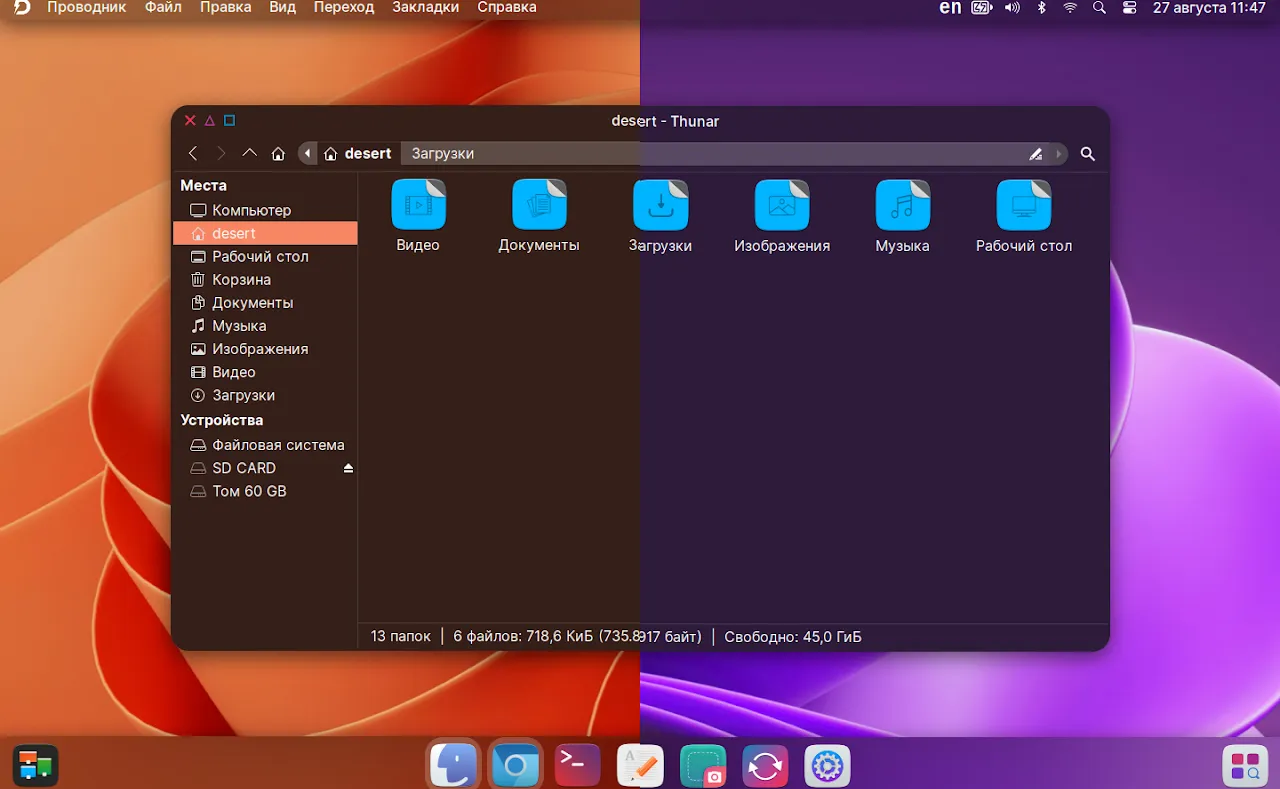
What really sets DESERT OS Linux 4.5 apart is its array of clever features that blend functionality with a dash of visual delight. Let's start with the theming system—it's dynamic and intuitive. The accent colours shift automatically based on your chosen wallpaper, creating a harmonious look across your desktop. This isn't just cosmetic; it makes the whole experience feel personalised and immersive, like the OS is responding to your creative choices. If you've ever spent hours fiddling with themes in other distros, you'll appreciate how effortless this is here.


Then there's the blur effect, adding a layer of sophistication to various elements. Some windows and applications support semi-transparency and blurring, which gives a modern, glassy appearance reminiscent of high-end interfaces but without the resource hog. It's subtle yet effective, enhancing readability and focus while keeping things light on your CPU and RAM. Picture working on a document with a blurred background—distractions fade away, and productivity soars. This feature is particularly lively on setups with decent graphics, but even on modest hardware, it runs smoothly thanks to XFCE's efficiency.

One of the more playful additions is the support for video wallpapers. Yes, you read that right—you can set an MP4 file as your desktop background or even on the login screen. Imagine a serene ocean wave or a bustling cityscape looping gently behind your icons. It's a fun way to inject personality into your setup, and it's surprisingly easy to implement. Just select your video file, and the system handles the rest. This isn't something you see in every distro, and it adds that lively touch that makes DESERT OS feel fresh and engaging.

Beyond visuals, DESERT OS comes with applications crafted specifically for the distribution. These aren't your run-of-the-mill tools; they're designed to integrate seamlessly with the overall aesthetic and functionality. While specifics on each app aren't exhaustively listed, they contribute to a cohesive experience, handling tasks like system tweaks or media management with ease. This bespoke approach ensures that everything feels unified, reducing the need to hunt for third-party software right out of the gate.


Performance-wise, being based on Ubuntu 24.04 LTS means DESERT OS benefits from the latest kernel improvements and driver support. It's optimised for AMD64 architecture, making it suitable for most modern 64-bit machines. If you're concerned about speed, rest assured—this distro is built to be lightweight, meaning quicker boot times and responsive multitasking. In educational terms, this is a great example of how open-source allows for optimisation: developers can strip away bloat and focus on what matters, resulting in an OS that's efficient without sacrificing usability.

Security is another strong suit, inherited from Ubuntu's robust framework. Regular updates keep vulnerabilities at bay, and the LTS base ensures long-term stability. For users in educational or professional settings, this reliability is key. Plus, the open-source nature means you can inspect the code if you're inclined, fostering trust and community involvement. It's empowering to know that the software you're using is transparent and continually improved by contributors worldwide.
Customisation extends to the login screen and desktop layouts, allowing you to arrange panels, widgets, and shortcuts as you see fit. XFCE's panel system is versatile, supporting applets for everything from weather to system monitoring. In DESERT OS 4.5, these are enhanced with the distro's unique styling, making customisation not just possible but enjoyable. If you're teaching someone about Linux, this is a perfect starting point—it's educational in showing how modular desktop environments work.


The beauty of Linux is its package management, and here you can easily add whatever you need via the terminal or graphical tools. For instance, if you're into coding, tools like Git or text editors are just an apt install away. This flexibility makes DESERT OS ideal for students, developers, or anyone exploring open-source alternatives.


Hardware compatibility is broad, thanks to Ubuntu's extensive drivers. Whether it's Wi-Fi, printers, or external devices, chances are it'll work out of the box. And for those rare hiccups, the community-driven nature of Linux means solutions are often a quick search away. In a lively sense, using DESERT OS feels like joining a global club where everyone shares tips and tricks.
Getting Started
Eager to give DESERT OS Linux 4.5 a whirl? The process is straightforward and beginner-friendly, much like other Ubuntu derivatives. First off, head to the official sources to grab the ISO file—there's an English version available for AMD64 systems, ensuring accessibility for a wide audience. Once downloaded, you'll want to create a bootable USB drive using tools like Rufus or Etcher. This step is crucial for the live mode, which lets you test drive the OS without any commitment.
Booting into live mode is as simple as restarting your computer with the USB inserted and selecting it from the boot menu—usually accessed by pressing F12 or similar during startup. Once loaded, you'll be greeted by the XFCE desktop, complete with the dynamic theming and blur effects. Take your time exploring: open apps, change wallpapers, even set a video background to see the magic in action. It's an educational moment, showing how Linux can run entirely from memory without altering your existing setup.

If you decide to install, the process mirrors Ubuntu's installer—user-friendly with options for partitioning, user setup, and more. You'll choose your language, keyboard layout, and whether to install alongside another OS or take over the drive. Remember to back up important data first, as with any installation. Post-install, you'll have a fully functional system ready for customisation. Updates are handled through the standard mechanisms, keeping everything current.


For those new to Linux, DESERT OS offers a gentle introduction. The XFCE interface is intuitive, with a start menu, taskbar, and desktop icons that feel familiar yet fresh. Educational resources within the Linux community can guide you further, but the distro itself is designed to be self-explanatory. Experiment with the custom apps—they're there to enhance your workflow, perhaps offering quick access to system settings or media controls.
Troubleshooting is part of the learning curve, but DESERT OS's lightweight nature means fewer issues overall. If something doesn't click, the project's contact options allow you to reach out to the author for guidance. This personal touch adds to the friendly vibe, making it feel less like a corporate product and more like a community effort.
As you settle in, you'll appreciate the efficiency: low RAM usage means you can run multiple apps without slowdowns, ideal for multitasking. Whether browsing the web, editing documents, or watching videos, it all flows smoothly. And with video wallpapers, your desktop becomes a canvas for creativity—perhaps a motivational clip or a nature scene to brighten your day.
In educational contexts, DESERT OS shines as a tool for teaching operating systems. Its open-source foundation allows for deep dives into how distros are built, from kernel to desktop. Students can learn about package management, file systems, and customisation without overwhelming complexity.
For professionals, the stability of Ubuntu LTS ensures it's viable for work, supporting tools like LibreOffice for productivity or GIMP for graphics. The blur and theming features add a professional polish, making presentations or remote work more enjoyable.
Ultimately, getting started with DESERT OS 4.5 is about embracing exploration. It's a lively invitation to the world of open-source, where you control your computing experience.
In wrapping up our deep dive into DESERT OS Linux 4.5, it's clear this Ukrainian gem offers a delightful blend of lightness, beauty, and functionality. Whether you're seeking a speedy daily driver or a platform for experimentation, it delivers with charm and efficiency. Give it a try—you might just find your new favourite distro.
Disclaimer: All trade names, trademarks, and product names mentioned herein are the property of their respective owners. At The Distrowrite Project, we strive for utmost accuracy in our content, drawing solely from official sources. We encourage responsible and legal use of open-source software, respecting licenses and community guidelines to foster a positive ecosystem.
Source: https://thedistrowriteproject.blogspot.com/2025/12/DESERT-OS-Linux-4-5-Ukraine-Lightweight-Linux-Gem.htmlThe English ISO DESERT_4.5_EN_amd64.iso is available to download here:
https://sourceforge.net/projects/desert-os-linux/files/release/
References: