October 1, 2015

9 Great Linux Mate Themes

I have really been enjoying the MATE desktop. Below are some great themes made to take advantage of the GTK2 environment. Enjoy.

One of the best things about being a MATE user is the fact that everything is super stable and reliable. This desktop environment hasn’t changed its looks in quite a long time. Everything is nearly like the way it looked in 2002.
This can be a good thing when it comes to usability. It’s tried and true. On the other hand, the MATE desktop doesn’t look very modern. The default themes it ships with aren’t very attractive, and overall it seems like it needs a face-lift.
Check out these nine themes that look great in the MATE desktop environment!
Note: the instructions to install each one of these themes are located on the page in which you downloaded them from.


Color UI Mate theme
If you didn’t notice from the picture above, Color UI was designed with the XFCE desktop in mind. That being said, it still looks awesome in MATE. Everything is very modern-looking and colorful. I know some people aren’t huge fans of using themes designed for other desktops. I get that. Still, if using a theme designed for another desktop doesn’t bother you, consider checking out this theme.
Absolute Mate theme
Absolute is a simple, grey theme. It’s not the most advanced and stylish theme ever created, but it certainly is fairly modern looking. The window manager style is top notch, and overall it’s just pleasant to look it. Do you like simple? Check out this theme.
Ubuntu Dust Mate theme
When it comes to GTK 2.x themes, they seem to all run together. A good chunk of them seem to fall into three categories: black/dark, transparent, or grey/white styled themes. Ubuntu Dust doesn’t fit that criteria. It’s a sort of shiny brown/dark sort of thing with some really neat user interface choices. It’s certainly different. If you like different, you might like this theme.
Ambiance & Radiance Flat Colors Mate theme
Flat is the latest design trend that everyone has been going crazy over. I can’t blame them as I think flat is cool too. To satisfy your craving for flat themes on MATE, Ambiance & Radiance Flat Colors exists. It’s a flatter take on the classic Ubuntu themes Ambiance and Radiance. It comes with several different color choices too. If you want a flat theme, this should be your first stop.
Orta Mate theme
Orta is a theme that has been around for quite a while. It’s one of the most famous ones too. There’s a good reason as to why everyone loves this particular theme: it’s beautiful. Even today it feels really modern. The window manager style is reminiscent of Mac OS X’s, and it has a nice metallic thing going on.
BSM Simple Mate theme
BSM Simple is a pack of simple GTK 2.x themes. The pack comes with Dark and Classic themes.
Elegant Gnome Pack Mate theme
Are you interested in making MATE elegant? Check out the Elegant Gnome Pack. It’s specifically designed to make GTK 2.x look beautiful. Many different themes are included so there’s most certainly something for everyone to choose from!
Zuki Mate theme
Zuki is a fairly solid theme. It has sort of a glass/transparent look to it, but it does it right. That’s not something I can say about all the glass themes I’ve seen. They always seem to look tacky. If you’re in need of a transparent-esque theme for your MATE setup, look no further.
Elegant Brit Mate theme
I’ll be frank. Elegant Brit is at the bottom because it’s not the most professionally-designed theme. That being said, it does manage to look cool and modern for what it is. I especially like the way this theme handles the task bar. If you’ve checked all the themes out above and still haven’t settled on one, try this one!
The MATE desktop is great, but it’s built on aging technology and is in dire need of a new look. These GTK 2.x MATE themes in this list can help with that. With this list I hope that you, too, will be able to make your desktop environment great.

Source: https://www.maketecheasier.com/9-great-mate-themes-linux/

September 30, 2015

9 Great Linux XFCE Themes

XFCE4. It’s everyone’s favorite lightweight desktop environment. This desktop environment has been around for quite a while. For much of the time that this desktop has been around, it hasn’t exactly looked the greatest. The default look for XFCE is frankly not that great.
Since the XFCE Desktop is in dire need of a facelift, we decided to go out and find nine really great themes for XFCE4. Check them out below!
Note: the instructions to install each one of these themes are located on the page in which you downloaded them from.
Axe theme for XFCE4.
Not all of the themes on this list are full themes. The XFCE4 desktop is an interesting one. You can theme the window manager and the panel independently. Axe is one of the many window manager themes in this list.
Axe is a clean and really minimal window manager theme. When it’s not in focus, the entire window is transparent which is a really cool effect. Want a clean, simple Xfce window manager theme? Check out this one.
Tango theme for XFCE4.
A lot of XFCE4’s window managers that come pre-installed are unimpressive. They’re all old-looking and frankly just not something visually appealing on any level. Tango is an XFCE WM theme pack that hopes to change that.
It’s an elegant, colorful and minimalist approach to window themes. It also sort of reminds me of the Windows 8 window manager. Are you in search of a decent-looking XFCE window manager theme? Tango might be for you.


Numix Holo is a pleasant re-spin of the Numix GTK theme. The creator of this theme has substituted the famous “Numix Orange” color scheme for a light blue Android Jelly Bean-inspired setup. If you love Numix, but also prefer blue over orange, definitely check out this theme.
Ambience theme for XFCE4.
Some people love the default look of Ubuntu. Others don’t. Ambiance for the XFCE desktop is a theme for those looking to make their XFCE session more like Ubuntu. If you think the Ambiance style suits you, this should be your first stop.
Glare theme for XFCE4.
Glare is a simple theme for the XFCE4 desktop environment. It doesn’t have a whole lot going for it in terms of eye candy, but that’s not necessarily a terrible thing. Sometimes its hard to find a very simple theme with no frills, shadows or anything like that. If you’re in search of a simple look for XFCE4, you might want to check out this theme.
Macbuntu theme for XFCE4.
Macbuntu is a suitable XFCE4 theme for those who want to turn their desktop into something very close to OS X. This theme isn’t 100% similar to the way the Mac looks, but it most certainly is very reminiscent of it. Searching for an Apple-like theme for your XFCE desktop? Try out Macbuntu.
Rele theme for XFCE4.
There certainly isn’t a shortage of dark themes. It’s hard to browse xfce-look.org and not run into more than twenty-five dark themes. Still, if dark is what you want, Rele is one of the best out there. The theme uses the darker colors in a really nice way and everything is really easy to read (which I can’t say about some other black/dark themes out there). Are black themes your thing? If so, you might want to install Rele.
XFWM KDE4.8 Oxygen theme for XFCE4.
It’s hard to deny that the KDE desktop environment has it right when it comes to their Oxygen theme. Honestly, it’s one of the better default themes out there for Linux. Are you a fan of the Oxygen theme like me? If so, install XFWM KDE4.8 Oxygen.
Win8-FirstTry theme for XFCE4.
Some Linux users love the way Windows 8/8.1 looks. No this isn’t a joke! There are dozens of Windows themes for Linux desktops. For those on XFCE, the Win8-FirstTry theme is a good place to start out. Be warned, the creator of this theme said it’s his first shot at a theme, so there might be a few discrepancies here or there. Still, if you want your desktop environment to look like Windows 8.1, you should give this theme a go.
XFCE4 is a great desktop environment. Overwhelmingly, it’s the most popular lightweight desktop out there. That being said, it’s not exactly the best-looking. The overall design of XFCE4 seems to be stuck in the mid-90s/early 2000s. I hope that with the help of this list you’ll be able to take your existing XFCE desktop and make it a little better looking.

September 19, 2015

How to adjust screen brightness in linux

This tip came from the current issue #59 of Full Circle Magazine. There are no brightness controls in Gnome GTK3.x  I'm running Ubuntu 11.10 under the Gnome Classic desktop. It fixed an aging CRT monitor I have and use in one of my rigs. Many thanks ! Enjoy.

Q: When I try to reduce the brightness on my laptop using System Settings, it doesn't change.

A: Open a Terminal, and enter this command:

xgamma ­-gamma .5


You can try different values than .5, to see what works for you. ( .8 works great for my monitor. )

The other available values are:

usage:  xgamma [-options]

where the available options are:
    -display host:dpy       or -d
    -quiet                         or -q
    -screen                      or -s
    -gamma f.f                Gamma Value
    -rgamma f.f               Red Gamma Value
    -ggamma f.f              Green Gamma Value
    -bgamma f.f              Blue Gamma Value

If no gamma is specified, returns the current setting


September XFCE OSX Theme Desktop

I've been enjoying the simplicity of Xubuntu 15.04 and thought I would give it a OSX theme this month. The great thing about linux is the ability to make it look anyway you want. So below are my results and where you can get the Minty Mac OSX XFCE theme. I'm using the Minty Mac OSX metacity theme and icons, and the installed Greybird theme and an old wallpaper and Docky. I installed Clementine music player, Deluge bittorrent client, Chromium browser, and Screenlets. Enjoy.


.


.


.


.


.


.


.


And two more different wallpapers....


You can get the Minty Mac OSX theme here:
http://xfce-look.org/content/show.php/mintymac-osx-theme-complete?content=166789


August 23, 2015

Linux Never Had a Better Chance to Beat Windows


The main feature is now privacy and not security


Windows 10 is out, and everyone is talking about it. It's clear that Microsoft did something right for a change and that the latest version of the OS is better than the previous releases. This is actually a good thing.

What's not great about it is the fact that Windows 10 collects huge amounts of data about your PC and you as a user, and most media outlets seem to think that it's OK and that it's just an evolution of the operating system. From my perspective, it's just another reason to move to Linux.

Many journalists have treated Windows 10 with a lot of lenience, to say the least. Many have said that Windows 10 does collect plenty of data, but that it is OK because others are doing it as well and pointed fingers at Google or Facebook. Just because others are doing it doesn't mean that it's OK for everyone involved. It's interesting to see how, in just a couple of years, we've moved from being apprehensive about sharing our personal details online to calling it an evolution.

There are so many things that send information from Windows 10 that it will take you a while to stop them all. Microsoft collects a ton data about you as a user, and not just about your computer. Stuff like location, preferences, and even contacts is being collected and sent by default if you don't stop it. Even with everything turned off, it's hard to determine if something else is happening.

I need to make one thing abundantly clear. There is nothing wrong with Microsoft gathering all of this data. They admit they do it, and they seem to be pretty forthcoming with everything. In the end, it's the user's choice, and if they want to be a part of the greater Windows ecosystem, which apparently needs a lot of user data to work, then it's fine.


Cortana as an example


This is just an excerpt from Microsoft's website. It's not an interpretation, just a quote. We're not judging, but this is what actually happens. It you want to know more, just visit the Cortana, Search, and Privacy: FAQ.
"When you use Cortana, Microsoft collects and uses information including your device location information and location history, contacts (People), voice input, searching history, calendar details, content and communication history from messages and apps, and other information on your device. In Microsoft Edge, Cortana collects and uses your browsing history."


Linux as an example


I have only two problems, and neither of them is with the Windows 10. One has to do with the media that makes all of this data collection, albeit legally binding, feel like it's the most natural thing in the world. Please, stop saying it's OK to gather it and that everyone is doing it. Linux is doing no such thing, and it needs no such thing.
The second problem I have is about the Linux community, which is not consistent with its criticism. To paraphrase The Joker, Microsoft is gathering every bit of data from Windows 10 and no one bats an eye, Ubuntu sends some search queries to Amazon and everyone is losing their minds.


Linux as an alternative


One of the statements that were floating online was that Linux missed a good chance to shine when Windows 8 turned out to be a flop. Well, I tell you that Linux never had a better chance than now. It provides the ultimate privacy protection, and it will never gather data about you or your PC. Linux systems will never need data from you to perform better. Linux is already doing almost anything better than anyone else.

A very clear line is being drawn right now. Windows is clearly opting to use the online components more in its internal functionality and Linux is going towards privacy. When you add the security component to this equation, you can only get a single answer.

Source: http://news.softpedia.com/news/linux-never-had-a-better-chance-to-beat-windows-489206.shtml

August 22, 2015

Windows 10 privacy concerns may help Linux

In today's open source roundup: Will Windows 10 privacy issues bring more users to Linux? Plus: Windows 10 keeps talking to Microsoft even when you try to shut it up. And Ars Technica readers sound off about Windows 10 and privacy
Windows 10 privacy concerns may help Linux
Windows 10 is out now, and many people are shocked at some of the privacy issues involved with Microsoft's latest desktop operating system. But will Windows 10 and its privacy problems prove to be a boon for Linux? A writer at Softpedia thinks that Windows 10 could be quite good for growing the Linux user base.
Silviu Stahie reports for Softpedia:
...Windows 10 collects huge amounts of data about your PC and you as a user, and most media outlets seem to think that it's OK and that it's just an evolution of the operating system. From my perspective, it's just another reason to move to Linux.
Many journalists have treated Windows 10 with a lot of lenience, to say the least. Many have said that Windows 10 does collect plenty of data, but that it is OK because others are doing it as well and pointed fingers at Google or Facebook. Just because others are doing it doesn't mean that it's OK for everyone involved. It's interesting to see how, in just a couple of years, we've moved from being apprehensive about sharing our personal details online to calling it an evolution.
There are so many things that send information from Windows 10 that it will take you a while to stop them all. Microsoft collects a ton data about you as a user, and not just about your computer. Stuff like location, preferences, and even contacts is being collected and sent by default if you don't stop it. Even with everything turned off, it's hard to determine if something else is happening.
A very clear line is being drawn right now. Windows is clearly opting to use the online components more in its internal functionality and Linux is going towards privacy. When you add the security component to this equation, you can only get a single answer.
More at Softpedia
Windows 10 keeps talking to Microsoft


Windows 10 comes with various privacy control settings, but a writer at Ars Technica notes that Windows 10 will keep talking to Microsoft even when you try to shut it up.
Peter Bright reports for Ars Technica:
Windows 10 uses the Internet a lot to support many of its features. The operating system also sports numerous knobs to twiddle that are supposed to disable most of these features and the potentially privacy-compromising connections that go with them.
Unfortunately for privacy advocates, these controls don't appear to be sufficient to completely prevent the operating system from going online and communicating with Microsoft's servers.
...Windows 10 will periodically send data to a Microsoft server named ssw.live.com. This server seems to be used for OneDrive and some other Microsoft services. Windows 10 seems to transmit information to the server even when OneDrive is disabled and logins are using a local account that isn't connected to a Microsoft Account. The exact nature of the information being sent isn't clear—it appears to be referencing telemetry settings—and again, it's not clear why any data is being sent at all. We disabled telemetry on our test machine using group policies.
We configured our test virtual machine to use an HTTP and HTTPS proxy (both as a user-level proxy and a system-wide proxy) so that we could more easily monitor its traffic, but Windows 10 seems to make requests to a content delivery network that bypass the proxy.
More at Ars Technica
Ars Technica readers sound off about Windows 10's privacy problems
As you might imagine, Peter Bright's article on Ars Technica caught the attention of the site's readers and they weren't shy about sharing their thoughts about Windows 10's privacy issues:


Caffarius: "If they don't release a way to stop this incessant collection of data, it's looking like all my machines are going to be Linux based once Microsoft's Windows 7 support drops off. Arch doesn't want to know a thing about me. And that's how I like it."
Anowack: "Surprise! A company that disrespects user privacy enough to remove the option to turn off telemetry in all consumer versions of its operating system is going to disrespect it in other ways also."
Causality: "This is completely ridiculous. Can somebody write an overhaul patch that just puts a "F##K OFF" button in the privacy settings menu?"
Delicieuxz: "The Windows 10 EULA and Microsoft's Privacy Statement declare that Microsoft will access and use the content of people's emails and other files, such as documents uploaded to One Drive, according to Microsoft's discretion. "Share with our partners" also includes law enforcement, wherever Microsoft deems required. And I think Microsoft cannot ignore any instance which they feel should be forwarded to law enforcement without making themselves complicit in any potential criminal activity.
Windows 10's all-your-contents-are-belongs-to-us policy is also a widening of the backdoor which law enforcement asks OS manufacturer to build into their systems.
Basically, Microsoft's Windows 10 EULA claims that all files used in Windows 10 may be accessed, searched, and contents utilized by Microsoft, with Microsoft exercizing sole discretion over what it will access, and how it will be used.
I think all businesses, content creators, and even nations should be dismayed at this."
Sifaka: "You should not need to install a firewall to stop your OS from sending data to a remote server."
ZPrime: "While what this article reveals is somewhat disconcerting, a lot of what MS mentions in its privacy policy is stuff that the product needs to function as intended (i.e. OneDrive, various Live Tile apps / etc) and people are just fearmongering the hell out of it.
Personally I have no problems with "telemetry" because it's not traceable to an individual user, and it's there to help improve the product. OTOH, as the article says, if I've turned off Bing / MSN crap, Windows shouldn't still be poking those URLs."
ZeroHazard: "Let's not forget the purely monetary concerns: metered internet. If it's constantly reading and sending your data to an offsite server, you're getting dinged by data usage charges. I wouldn't be surprised if ISPs welcomed this 'feature' with open arms and greased palms."
Peter Chastain: "Does the postal carrier need to know the contents of my mail in order to deliver it? Does the storage center need to know the exact contents of my boxes, or only that they don't contain harmful material?
MS doesn't need to know the contents of your files or your emails to store or deliver them. They do need to know the contents if they want to send you targeted offers or turn you over to law enforcement."
Temtka: "Right now I am dual booting Windows 10 Enterprise and Linux. I use linux for 95% of my stuff. Windows for the other 5%. I store nothing personal on my Windows partition. Which is sad, because for the most part I really like Windows 10. Too bad it can't be Windows 10 without all the tracking."
PaidthePrice: "Microsoft's final good operating system is and will be Windows 7. Now, Microsoft treats every device like a cell phone. So they treat it as a "service" not a product. I prefer a product over a service."
More at Ars Technica

Source: http://www.itworld.com/article/2969704/linux/windows-10-privacy-concerns-may-help-linux.html

August 21, 2015

A linux alternative for Windows users - Xubuntu 15.04

With the discovery of Microsoft tracking everything you do on Windows 10, there is a renewed interest in open source linux software. Google also does the same. To this effort, I setup the latest Xubuntu 15.04 as a Windows XP / 7 / 10 alternative. I am using the Radiance theme for a polished look from my previous post this month. Also installed the excellent newly released Clementine and Yarock music players with built-in Internet radio stations. Below are my results and a link where to download the latest Xubuntu. Open source works....!


You can also give Xubuntu a Windows 8/10 theme as well. See the link below to get it.


You can get the XFCE theme, XFCEight here:

http://xfce-look.org/content/show.php/Xfceight?content=158227


You can download Xubuntu 15.04 here: http://xubuntu.org/getxubuntu/

August 20, 2015

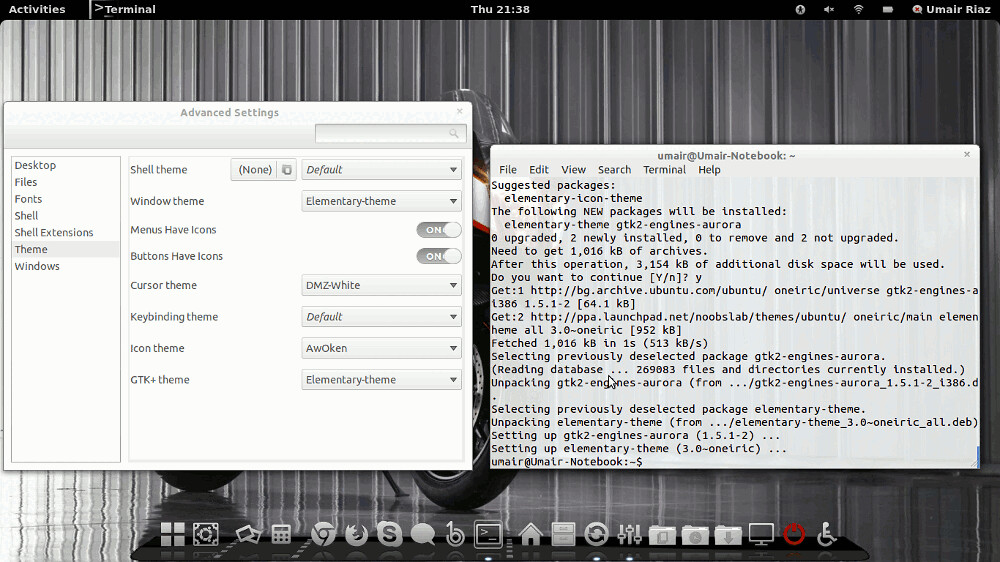
Install Elementary 3.0 Gtk 3 Theme on Ubuntu

Install Elementary 3.0 Gtk 3 Theme on Ubuntu 12.04 Precise/11.10 Oneiric/Linux Mint 12

elementary theme

Changes in Elementary Gtk theme 3.0 version:
  • GTK3 support, including :backdrop class, but there’s no dark theme yet
  • elementary now uses the Unico GTK3 engine
  • Granite support (which is used by many applications that will be default in the elementary OS Luna, such as BeatBox, etc.)
  • Dropped GTK2 classes for GTK3 apps so there’s no more support for applications like Nautilus elementary and others (so any application that has a GTK3 version doesn’t have support for GTK2 anymore)
  • The default placement is now close:maximize
  • The maximize button has been changed from the “+” (typically used to mean new) to two opposing arrows
  • And More.

To install Elementary Theme via Noobslab PPA on Ubuntu/Mint GTK3 open Terminal (Press Ctrl+Alt+T) and copy the following commands in the Terminal:
Enjoy

(Elementary OS) Noise Audio Player for Ubuntu/Linux Mint/other Ubuntu derivatives

Install Noise Audio Player in Ubuntu 13.04 Raring/Ubuntu 12.04 Precise/Linux Mint 15/13/other Ubuntu derivatives

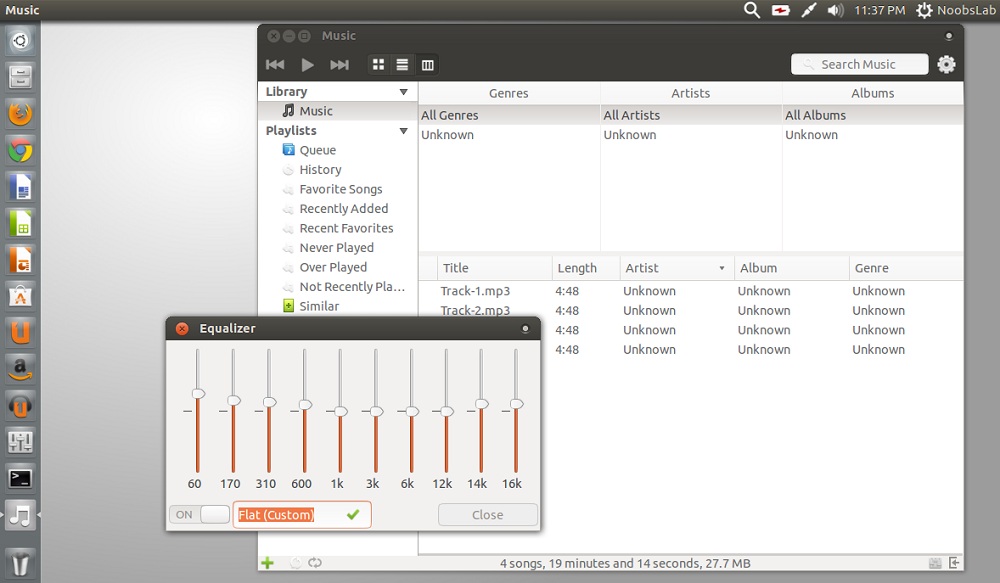
Noise is an official audio player in Elementary OS Luna. Noise is a fast and beautiful GTK3 audio player with a focus on music and libraries. It handles external devices, CDs, and album art. Noise utilizes Granite for a consistent and slick UI. It automatically find tracks and show them without any complication.
It exposes albums in big shadowed previews, display extra information to the selected tracks, also previews helped by the right-side panel. It has it's own offers Equalizer to adjust track tone. Also there are filters in the left pane, like favorite, never played, history, recently added, and similar. 
Noise also can handle external devices, such as: iPods, iOS devices and syncing music to Android devices. Additionally, it offers CD ripping, separate partitions, and more.

noise player

noise player
Note: It is not available for Ubuntu 12.10 Quantal/Linux Mint 14

To install Noise Player in Ubuntu/Linux Mint open Terminal (Press Ctrl+Alt+T) and copy the following commands in the Terminal:


That's it


Source: http://www.noobslab.com/2013/08/elementary-os-noise-audio-player-for.html